
How to Enter Meter Readings
Each month between the 1st and 15th, facility owners (and any other authorized users) are able to log in and enter production readings. You will always be entering your production as of the end of the previous month. For example, if you are logging in between June 1st and June 15th, you will be entering your facility’s May reading.
Facility owners do not need to enter readings every month, but we recommend entering readings at least every few months.
1. Log in
To enter your reading, log in to your SREC Delaware account.
2. Click “Enter Reading”
Click the “Enter Reading” button to the right of your facility name.

3. Enter your reading
On your facility’s Production tab, enter your reading in the “Required reading” box. Enter your reading in kilowatt hours (kWh). If your value is reported in megawatt hours (MWh), you will need to multiply by 1,000 to convert to kWh.
Once you enter your meter reading, click “Submit.” This will save your meter reading into our system.
See below for information on what value to enter.

Cumulative vs. Monthly Readings
Before entering meter readings, it is important to distinguish what type of reading you should enter. There are two types of meter readings:
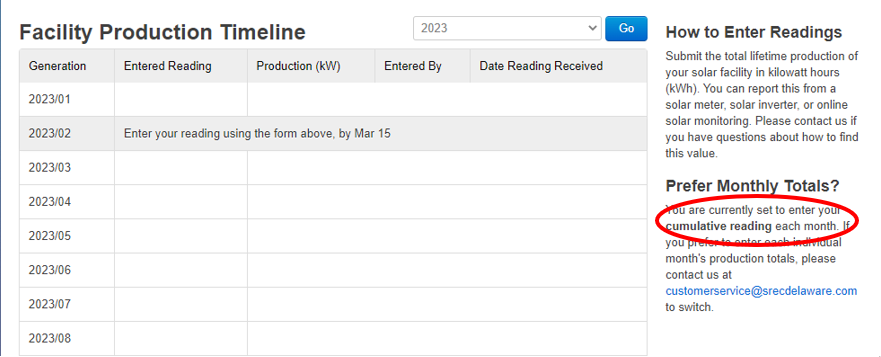
To the right of the “Facility Production Timeline,” your account will indicate the type of reading you are supposed to enter.
Source of Generation Data
Generation data must be reported from a solar meter, solar inverter, or online solar monitoring system. Reporting from your utility meter (generally labeled with your utility’s company name) or Net Energy Meter is not permitted. Using estimated or calculated data based on historical generation is also prohibited. Fraudulent reporting of generation data constitutes a breach of your contract and may result in default. If you have questions about locating this value, please contact us.
Any changes to installed equipment must be reported to the SREC Delaware Administrator, including new meters, inverters, or panels.
Before reporting your generation data, we must verify that your equipment information is accurately updated in the SREC Tracking System to maintain program compliance. Additionally, if your meter has rolled over from 99,999 kWh to 0 kWh, your records must be updated accordingly.
To report equipment changes, please contact us at [email protected].